
Android app · Live data · Germany

Spritpreise An Android app for live fuel prices

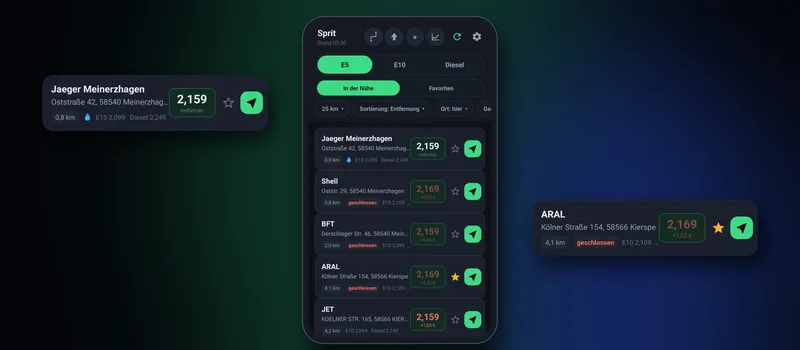
Our own Android app that shows at a glance where fuel is cheapest nearby right now – built for everyday use and for use on the road.

Spritpreise: an Android app for live fuel prices Coming soon to Google Play
PlatformAndroid
DataTankerkönig / MTS-K
LanguagesGerman, English, Russian
StatusComing soon to Google Play

The situation

Fuel prices in Germany change several times a day, and two stations in the same town are often several cents per litre apart. Many well-known apps are cluttered with ads, slow or impractical when you are behind the wheel.

The goal was a lean app that instantly shows what matters: which station nearby is cheapest, whether it is open and how to get there with a single tap.

What we built

The solution.

01

Prices nearby

Live prices for E5, E10 and diesel from Germany's official market transparency unit – with radius, sorting by distance or price and an open/closed indicator.

02

Difference in euros

Instead of cents only, the app shows how much more or less a full tank costs compared with the nearest station – detour included. You see at once whether the drive pays off.

03

Favourites, map, navigation

Save favourite stations with a star, see every station on the built-in map and start navigation with one tap.

04

Made for the car

Large buttons, a dark design and clear contrast – so the app is quick and safe to use on the go.

All features

What the app does in detail.

Spritpreise is much more than a price list. Here is every feature of the current version 12.1 – from the first look at the list to reading the car via OBD-II.

01Home screen & list

  • Switch between E5, E10 and diesel with one tap – changing the car selects the right fuel automatically
  • “Nearby” within 1 to 25 km, or only “Favourites”, wherever they are
  • Sort by distance, price, savings including the detour, or name
  • Check prices in another town without driving there
  • Filters for autogas and for your preferred station brands
  • “Best price” label for the cheapest and “next door” for the nearest station
  • For every station: how much more or less a full tank costs compared with the nearest one – detour included, marked green, orange or red
  • Star for favourites, green arrow hands the destination straight to navigation
  • Lock-out protection: prices are requested at most once a minute, the app shows the seconds left
02Station details

  • Open or closed and distance – updated live on the move
  • All three prices, the selected fuel highlighted
  • Calculation for your car: full tank in euros, round-trip detour in km and euros, total
  • Personal price history: “3.2 cents cheaper than usual at this station” – after five observations
  • “How far really?” – calculates the real driving route instead of a straight line
  • Neighbourhood comparison: “Worth it: save €6.91 at …” or “Filling up here is cheaper”
  • Opening hours and a direct jump to this station's price history

03Map

  • Price tags instead of dots: green for the cheapest, dark blue for close, burgundy for expensive
  • Overlapping tags are hidden automatically – the most expensive first
  • Blue dot on a tag marks autogas, your position is a glowing circle
  • Light or dark map, zoom by pinch, double tap or buttons
  • Works offline too: loaded map tiles are stored and cleaned up automatically above 60 MB

04Route & trip mode

  • Enter a destination or pick one from history – stations along the way in 3 to 15 seconds
  • Own filters: maximum detour, sort by route, price or savings, there and back, how far ahead to search
  • “Let's go”: the list shows only stations on the way – too far off or already passed are hidden
  • Trip window over other apps: remaining kilometres, time, litres and euros – without new requests
  • The route stays saved and can be resumed later

05Speed circle & trip window

  • Floating speed circle over any app, freely movable
  • One tap turns it into a “pill” with the two nearest stations, price and distance
  • Double tap opens the app – so you never fall into it by accident
  • Colour by the car's economical speed: green, orange (up to 15 km/h above), red
  • Shrinks back after 10 seconds without touch, long press switches it off

06Widgets

  • Three sizes: compact (best station), medium (several) and large (up to eight stations)
  • Medium and large scroll, tapping a row opens the station
  • Own refresh button, choice of nearest or favourites and sorting

07Learning journal

  • The app remembers every price: average per station, 24 hours of the day, places and trips
  • Time-of-day hint: “Currently 8.6 cents above usual – cheapest around 11 am”
  • Place hint: “Usually 4.2 cents cheaper in Troisdorf – 6 km from here”
  • Silent background sampling every 2 to 12 hours so evening and night prices are captured too
  • Two ways to find the “expensive hour” – per station or by average, chosen automatically
  • “What has accumulated” overview and price history from a few hours up to a year

08Autogas (LPG)

  • Autogas prices are not reported in Germany – so the app remembers where gas is available
  • Mark it right in the station: available · not available · don't know
  • After two minutes at the pump the app asks – at most once an hour
  • Learning mode on the road: a short question when passing by, optionally by voice
  • Existing marks only change after confirmation – no accidental overwriting

09Reading the car via OBD-II

  • With an ELM327 Bluetooth adapter: fuel level, consumption, speed, temperature and voltage in 10 to 20 seconds
  • “What can my car do?” – lists every value the vehicle provides
  • All values on a separate screen as cards with code, name, value and explanation
  • Raw adapter log to copy
  • Short connection instead of a permanent one – other apps such as Car Scanner keep working and the battery is spared
  • Works with most cars using the OBD-II standard (petrol from 2001, diesel from 2004)

10In the car & automation

  • Detects getting in via the Bluetooth connection to the car radio
  • On getting in: tip for the cheapest station – as a notification or by voice
  • “Ahead only” mode: shows stations in the driving direction and switches on by itself above a set speed
  • Motorway detection: stations on your side of the road, expensive motorway stations can be hidden
  • Several cars with consumption, tank size, fuel and their own economical speed

11Voice

  • Off, male, female or system voice
  • Speaks like a sat-nav: music dips briefly, navigation prompts stay audible
  • Speed warning with your own text, thresholds and repetition adjustable

12Usability & design

  • Light, dark, follow system or automatic by light sensor
  • Own brightness and automatic dimming in the evening
  • Languages: German, English, Russian
  • Guided tour for every screen – repeatable at any time
  • Almost every button explains itself on long press

13Privacy & control

  • Journal, marks, addresses and cars stay on the phone only
  • Price retention from 14 days to unlimited, default 90 days
  • “Forget in parts”: delete price history, station averages, hours or trips separately
  • Notification when a favourite station gets cheaper
  • Every feature can be switched on and off individually – nothing is forced on you

To be honest: what the app can't do

  • Prices for Germany only – the source is the German market transparency unit for fuels
  • No gas prices, because they are not reported
  • No manufacturer-specific vehicle data – only the open OBD-II standard

Result

The app is in daily use and under active development. Publication on the Google Play Store is being prepared – the link will appear here as soon as the app is available.

Coming soon to Google Play

More projects

All projects

Free consultation

Let's talk about your project.

Three fields are enough. We'll get back to you personally within 1–2 business days.

Detailed form